
📊 Creating Vocabulary Sets with Excel or OpenOffice
Creating your own lists in a spreadsheet program is the classic way to prepare larger quantities of vocabulary quickly and error-free.
1. Prepare Table
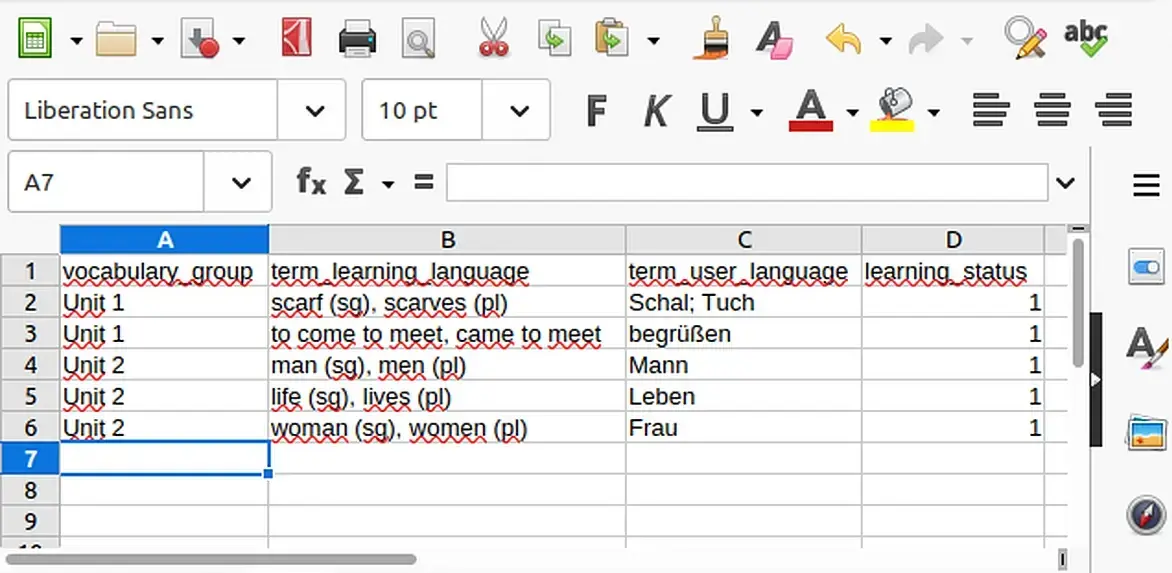
Create a new table and set exactly these four column names in the first row:
vocabulary_group (Group, e.g. "Unit 1")
term_learning_language (Foreign language, e.g. "Hello")
term_user_language (Native language, e.g. "Hallo")
learning_status (Learning level 1–5, default: "1")
term_learning_language (Foreign language, e.g. "Hello")
term_user_language (Native language, e.g. "Hallo")
learning_status (Learning level 1–5, default: "1")
2. Enter Vocabulary
This is what your table should look like in Excel or LibreOffice Calc:
3. Save as CSV
So that the converter can read the file, it must be saved in CSV format:
- Select File → Save As.
- Choose CSV (Comma-delimited) as the file type.
- If possible, pay attention to the UTF-8 encoding so that special characters are correctly transferred.
Next Step:
Once you have finished your CSV file, you can convert it in our converter and then import it into the app:
×
![Full Screen Screenshot]()